
Know Your Profit on Every Job
See what a job should make when you quote it and what it really made once the bills, receipts and timesheets are in. Every dollar tracked against the job it belongs to.
No more end-of-month surprises. No more guessing which jobs make money.
Start Free TrialEvery job
Estimate against actual profit
AI
Receipt scanning
One screen
Across-business view
Every dollar, tied back to the job
Tradies don't have time for spreadsheets. Cooledge captures receipts on the truck, sends clean POs to your suppliers and reconciles bills against those POs to catch overcharges. Then it puts what the job really cost beside what you expected it to make when you quoted it.
- Snap a receipt on the mobile app. AI reads the supplier and total for you
- Send purchase orders to suppliers with one click
- Bills auto-match against POs to catch overcharges
- Returns and refunds tracked as credit notes
- Estimate against actual profit on every job, all ex GST
- Labour costed from finished timesheets at each person's rate
- Costs sorted into Materials, Subcontractor and Other
- One hub for every expense, PO, bill or credit note across the business
Know your margin before you send the quote
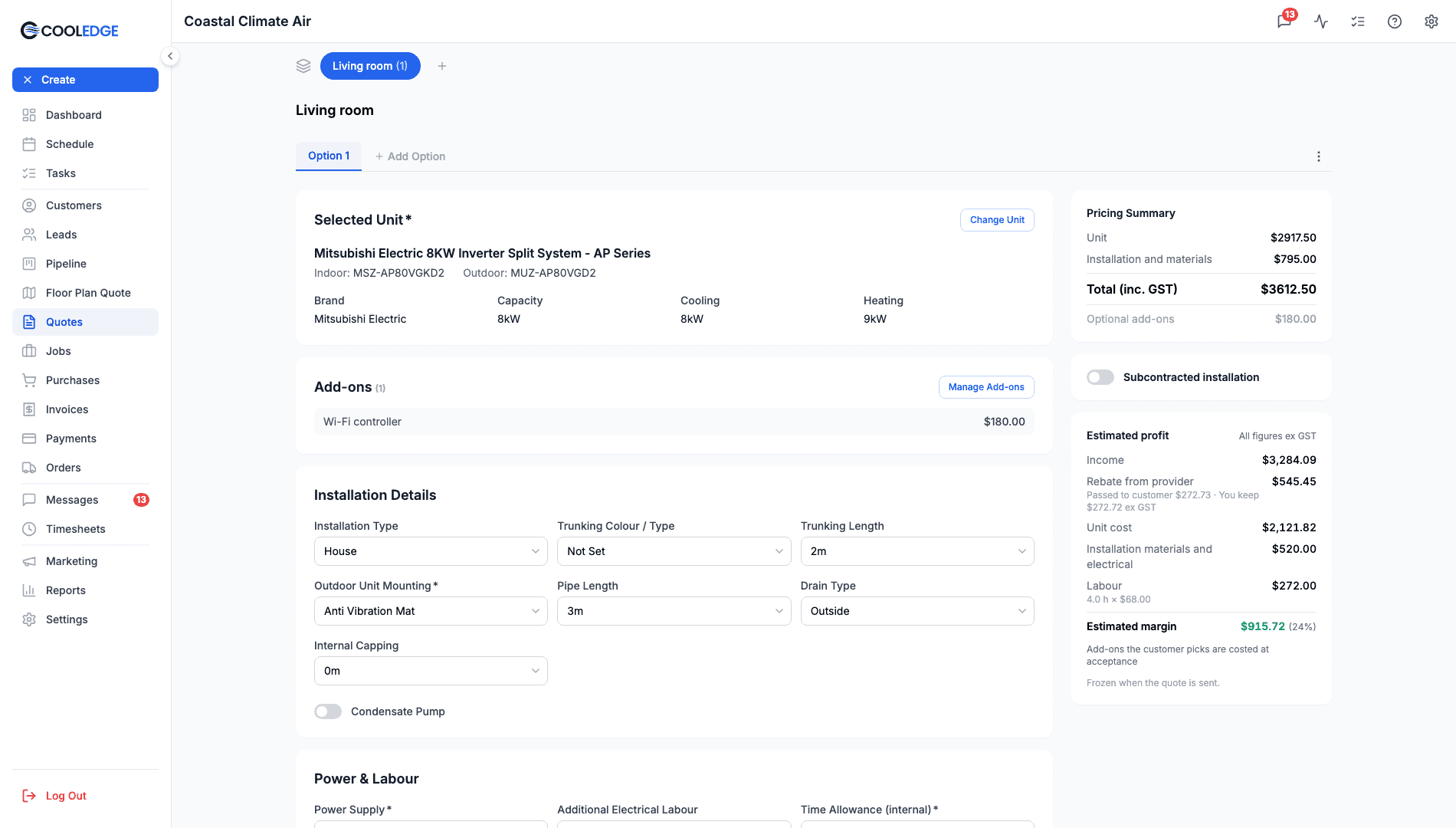
The quote editor shows an Estimated profit block beside the pricing, so you can see what the job should make while you price it. Cooledge records the estimate when you send the quote and freezes it when the customer accepts.
- Unit cost, installation materials and electrical, labour and the estimated margin, all ex GST
- Expected labour is the priced hours at your default labour cost rate
- Subcontracted installation on split, multi, VRV, install only, ducted and ventilation quotes
- Enter the subcontractor fee and your installation price. Type a mark-up and Cooledge offers the price to use
- Customers see a normal installation price. Owners and admins see the estimate
See which jobs lost money and why
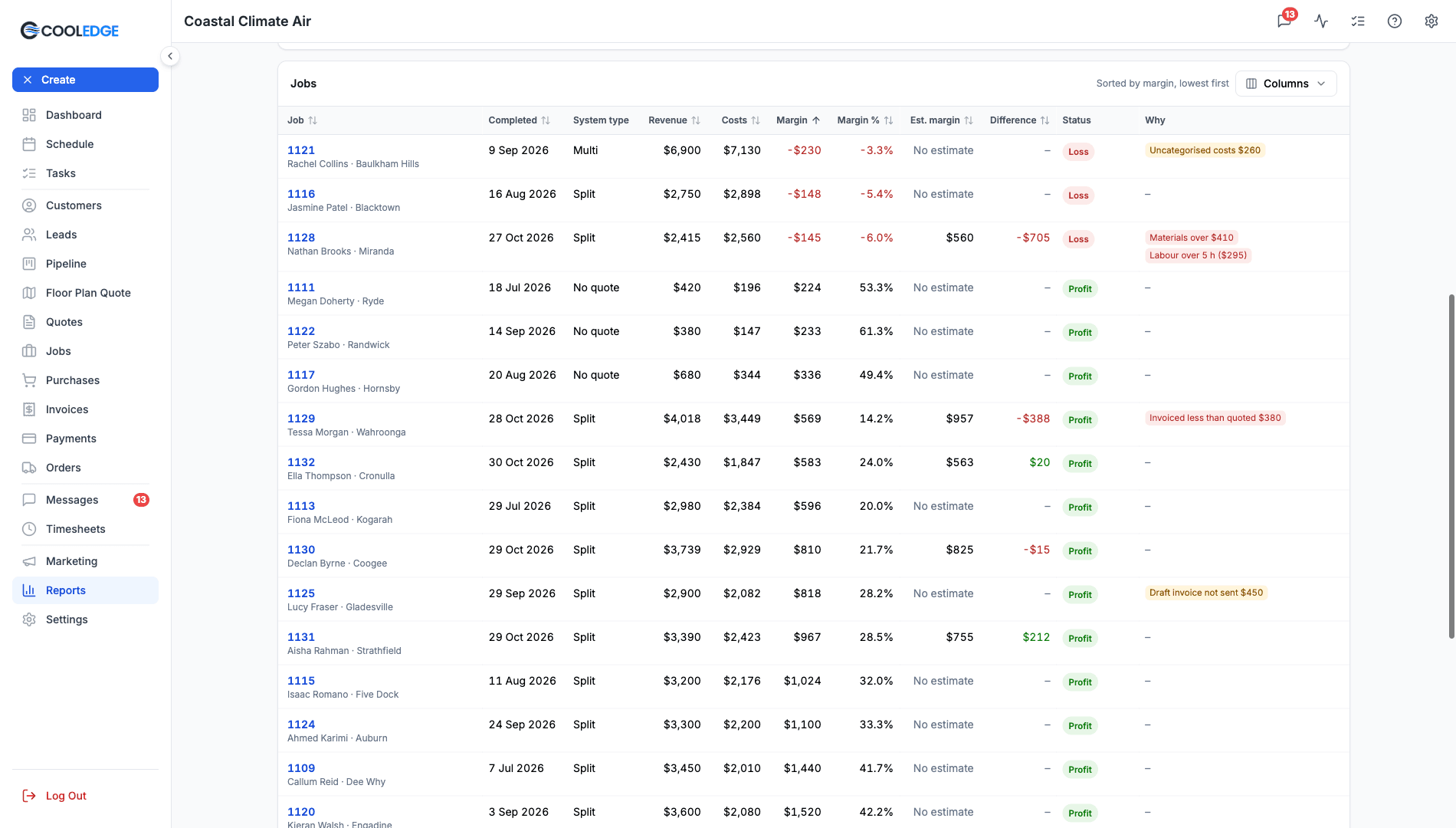
The Job profitability report lines up every job over any date range. The worst jobs sit at the top, each with the reasons behind its margin, so you know what to price differently next time.
Job Profitability Report guide- Revenue, costs, margin and jobs that lost money for any date range
- Reasons where the figures show them, like Labour over 5 h or Materials over $410
- Group by month, job category, system type or technician
- Pick your columns, filter to the losses and click through to the job
- The owner downloads it as a CSV or a PDF with your logo
- Contractors paid by the job stop counting their hours as labour
- Money reports for rebates, cash collected, receivables and work to invoice
Energy rebates, tracked to the job
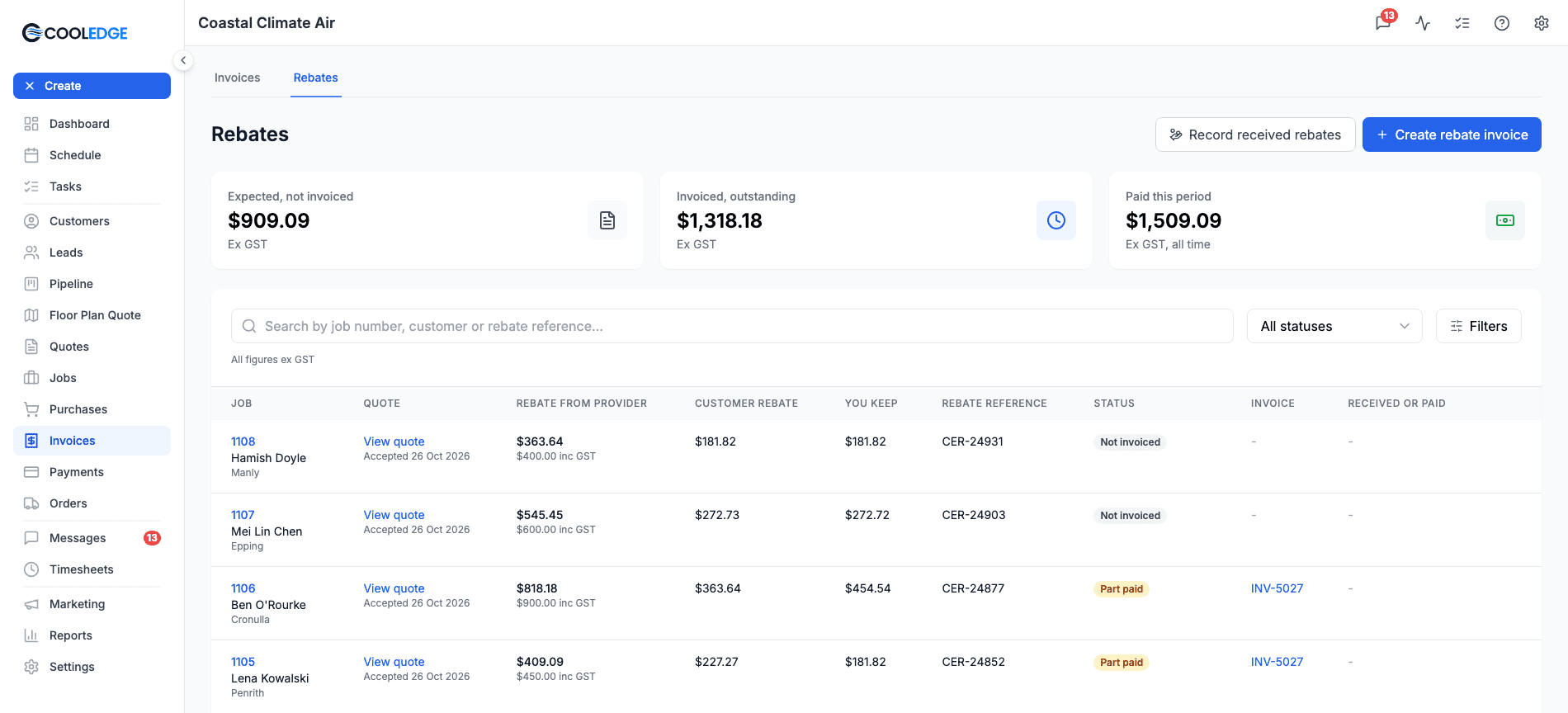
Claim energy rebates from a provider? Turn on Rebates in Company Settings and Cooledge keeps what the customer gets apart from what you collect.
Discount ($)
A discount the customer sees on the quote.
Customer rebate ($)
The rebate passed on to the customer, shown on the quote.
Rebate from provider
What the provider pays you. Owners and admins only.
You keep
The provider rebate less the customer rebate.
How It Works
Six steps from receipt in hand to real profit on every job
Snap a receipt
Open Quick Expense on the mobile app and snap a photo. AI reads the supplier, the date and the total.
Review and save
Confirm what the AI found, pick a category, attach to a job and save. Done in seconds.
Send a purchase order
Build a PO on any job, pick the supplier, hit send. Cooledge emails a clean PDF and tracks when it went out.
Reconcile when the bill arrives
Click Convert to Bill on the PO. The line items carry across. Match the total. Save.
Compare estimate with actual
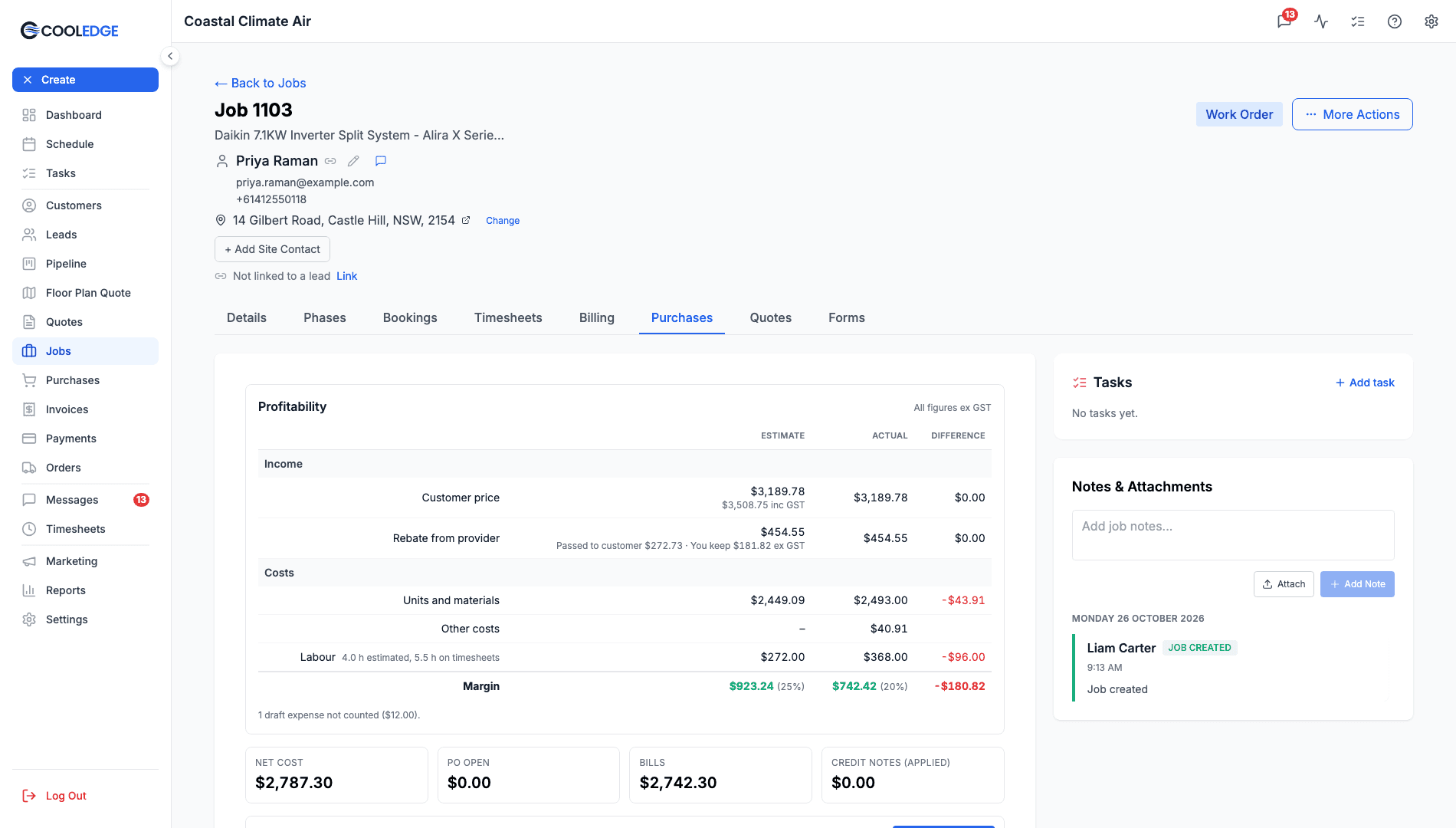
The Profitability card on the job shows Estimate, Actual and Difference, all ex GST, with labour from finished timesheets.
One hub for everything
Every expense, PO, bill or credit note across the business on one screen. Filter by job, supplier, date or type.
Powerful Features Under the Hood
Receipt OCR, clean purchase orders, profit on every job and a report across all of them. All wired together.
AI Receipt Scanning
Snap any receipt. Cooledge reads the supplier, date and total in seconds. Works on faded thermal paper. Works on PDF invoices too.
- Supplier and date detected automatically
- Total amount pulled straight from the receipt
- Confidence indicator shows when to double-check
- Works from mobile (camera or library) and from the portal (PDF or image)
Clean POs to Suppliers
Build a PO on any job, pick the supplier, send. Cooledge emails a professional PDF, tracks the send, timestamps when. When the bill comes back, one click converts it.
- Sequential PO numbering per business
- Email plus clean PDF to the supplier
- Optional CC line for your own records
- Lines priced from your supplier's pricebook on Growth and Scale
- Convert PO to Bill in one click
Estimate Against Actual
Every job has a Profitability card with Estimate, Actual and Difference columns, all ex GST. The estimate comes from the accepted quote. The actual comes from your invoices, bills, expenses, credit notes and timesheets.
- Costs split into units and materials, subcontractors, other costs and labour
- Labour from finished timesheets at each person's cost rate
- Margin in dollars and as a percentage
- A Profitability section on the mobile job screen too
- Owners and admins only. Team members never see estimates, cost rates or margins
Everything in one place
One screen with every expense, PO, bill or credit note across your business. Filter by job, supplier, date or type. Stats up top show open POs, unpaid bills plus total spend.
- Filter by job, supplier, date or type
- Stats up top show what's open
- Click any row to edit
- Quick-add expense or PO directly from the hub
Job Profitability Report
Every job over any date range in one report, with revenue, costs, margin and the reasons behind the losses. The same figures as each job card, so the two always agree.
- Presets for this month, quarter or financial year, or your own dates
- Group by month, job category, system type or technician
- Unbilled jobs kept out of the totals, so they never read as losses
- Owner-only CSV and PDF export with your logo
Contractors Paid by the Job
A subbie who clocks in on the app but bills you a fixed price is counted once. Tick Paid by the job and their bill is the cost, not their hours.
- One tick per person in Labour cost rates
- Their hours still recorded on timesheets
- Choose whether past jobs change or only new entries
- Works on the job card, the mobile app and every report
Stop guessing which jobs make money
Most field-service businesses don't know their per-job margin until the books are reconciled at the end of the month. By then it's too late to adjust pricing on the next quote. Cooledge changes that. Every receipt, every bill and every credit note flows back to the job as it's recorded.
Margin you can check against the quote
Each job compares what you expected to make with what it really made, so you know which jobs to price differently next time.
Receipts no longer pile up in the glovebox
Snap. Forget. Cooledge stores the receipt, reads the supplier and total and attaches the expense to the job.
POs that suppliers actually like
Clean branded PDFs sent direct from Cooledge. No more long SMS threads or scribbled-on order pads.
Find any purchase in seconds
Filter the Purchases hub by job, supplier or date. Every dollar accounted for.
Purchases
Total spent
$12,840
Open POs
4
Unpaid bills
3
Harbour HVAC Supplies
Copper fittings
Harbour HVAC Supplies
PO-0184 · Outdoor unit + pipework
Kelly Install Co
INV-9921 · Installation
Harbour HVAC Supplies
CN-0042 · Returned valve
Northside Electrical
Isolator + cable ties
Works With Your Existing Workflow
Read the guides
Step-by-step walkthroughs for purchases, profitability and rebates.
Ready to streamline your business?
Try free for 14 days. Create professional quotes and manage jobs in minutes.
Cancel anytime.