Business Callouts (Why Choose Us)
Display trust-building callout points on your public quote pages to increase acceptance rates
Business Callouts (Why Choose Us)
Business Callouts let you display "Why Choose Us" trust points on your public quote pages. These callouts help differentiate your business and increase quote acceptance rates.
What Are Business Callouts?
Business callouts are short, punchy statements that highlight your business strengths. They appear on your public quote pages, giving customers reasons to choose you over competitors.
Example callouts:
- Licensed & Fully Insured
- 5-Star Google Rating
- Same-Day Service Available
- 10+ Years Experience
- Family Owned & Operated
- Free Quotes
Setting Up Business Callouts
Accessing Settings
- Go to Settings → Quote Preferences in the portal
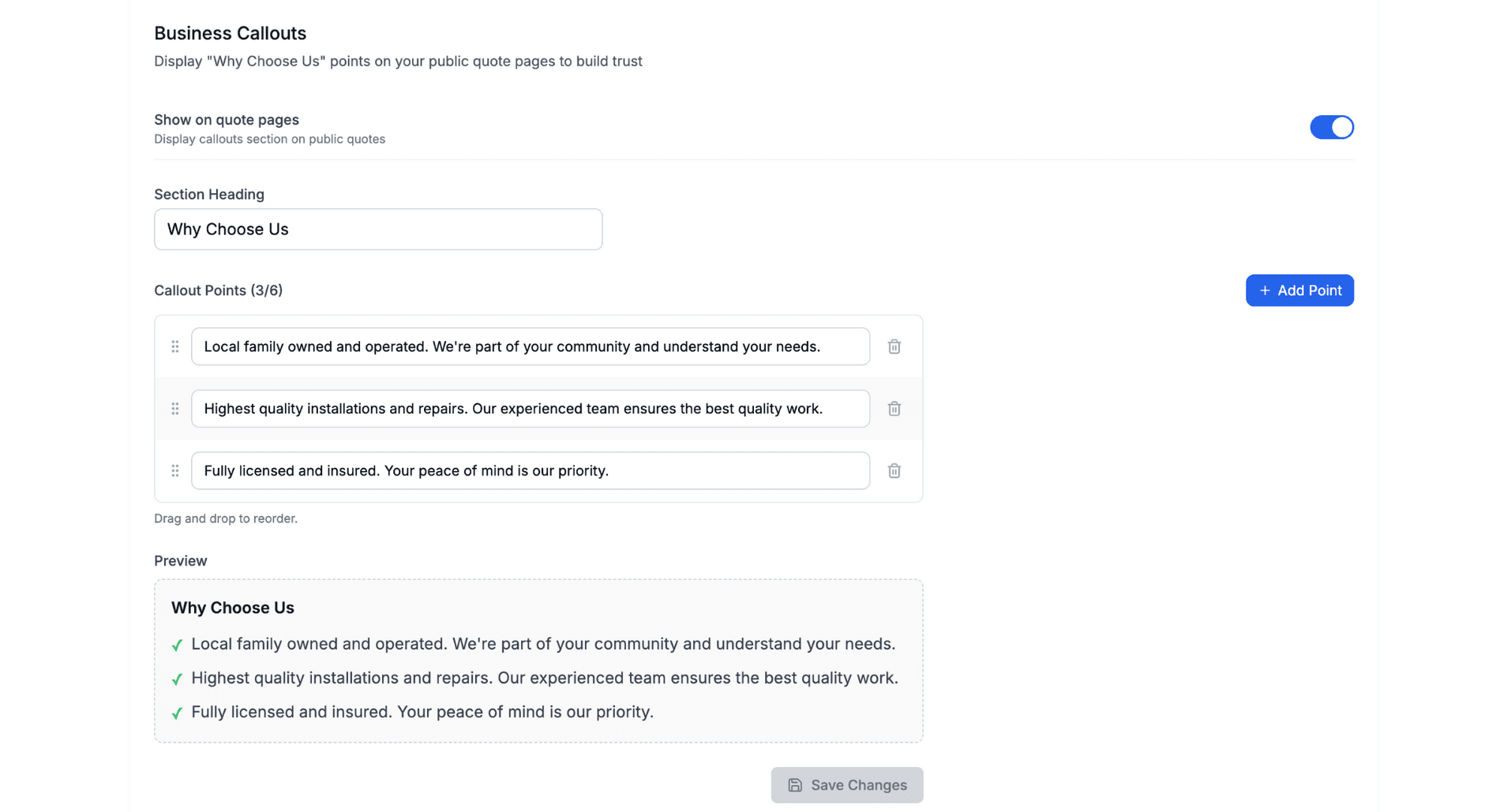
- Scroll down to the Business Callouts section
- Toggle Show on quote pages to enable
Adding Callout Points
- Enter your first callout in the text field
- Press Enter or click the + button to add
- Repeat for additional callouts (maximum 6)
- Drag to reorder if needed
Customising the Heading
By default, the section heading is "Why Choose Us". You can customise this:
- "Why [Your Business Name]?"
- "Our Promise"
- "What Sets Us Apart"
- "The [Business Name] Difference"
Best Practices
What Makes a Good Callout
Be specific:
- ❌ "Good service"
- ✅ "24/7 Emergency Service"
Include proof points:
- ❌ "Great reviews"
- ✅ "4.9★ Rating on Google"
Highlight certifications:
- ✅ "Licensed & Insured"
- ✅ "ARC Certified Technicians"
Address concerns:
- ✅ "No Hidden Fees"
- ✅ "Written Warranty Included"
Recommended Number
- Minimum: 2 callouts (shows you have multiple strengths)
- Ideal: 3-4 callouts (easy to scan)
- Maximum: 6 callouts (don't overwhelm)
What to Include
Consider highlighting:
| Category | Examples |
|---|---|
| Credentials | Licensed, Insured, Certified |
| Experience | Years in business, jobs completed |
| Service | Same-day, emergency, on-time |
| Quality | Warranty, genuine parts, brands |
| Social proof | Rating, reviews, awards |
| Value | Free quotes, no call-out fee, price match |
How It Appears on Quote Pages
When enabled, your callouts display in a clean section on your public quote page:
┌─────────────────────────────────────┐
│  Why Choose Us                      │
│                                     │
│  ✓ Licensed & Fully Insured         │
│  ✓ 4.9★ Google Rating (120 Reviews) │
│  ✓ Same-Day Service Available       │
│  ✓ 10+ Years Local Experience       │
└─────────────────────────────────────┘
The callouts appear near the top of the quote, before pricing details.
Preview Your Callouts
After adding your callouts, use the preview panel in settings to see exactly how they'll appear:
- Add your callout points
- Check the Preview section below
- Make adjustments as needed
- Save your changes
Tips for Different Trades
HVAC / Air Conditioning
- ARC Licensed Technicians
- All Major Brands Serviced
- Warranty on All Work
- Free On-Site Quotes
Electrical
- Certificate of Compliance Provided
- 24/7 Emergency Callouts
- Pensioner Discounts Available
Plumbing
- Licensed & Insured Plumber
- Same-Day Service
- Upfront Pricing – No Surprises
- Lifetime Labour Guarantee
General Trade
- Police Checked Staff
- Fully Insured
- Free Written Quotes
- Clean & Tidy Workmanship
Related: Quote Preferences & Settings → | Quoting Basics →
Need help with business callouts? Email us at support@cooledge.com.au
Was this article helpful?
Let us know if you found this information useful.
Still need help? Contact support
In this article
Use your browser's search (Ctrl+F) to quickly find specific topics within this article.
Browse all help articles →Related Articles
Auto Duct Layout
Visual duct designer on the ducted floor plan wizard. Auto-route or draw by hand. Includes outdoor unit and refrigerant pipework. Drives the take-off.
Custom PDF Pages
Add professional cover pages, warranty info, maintenance plans and more to your quote and invoice PDFs
Document Theme Customisation
Customise the look and feel of your quotes, invoices and PDF documents with branded themes, colours and fonts